Converting 3D Models to Isometric Sprite Sheets
I’ve been working on an isometric simulation game recently. I happened upon this thread, where a developer at Supergiant Games sheds some light on the rendering techniques used by titles like Bastion and Hades: assets are created in 3D, then rendered to massive sprite sheets containing every animation at every possible angle. At runtime, all rendering is 2D.
Performance will ultimately limit how many on-screen units my game can can simulate, so I like the idea of pushing as much heavy lifting as possible into the build. This weekend, I put together a simple asset pipeline to import 3D models into my 2D game using a similar technique. Here’s the result:
If you want to use this workflow yourself or dive into the code for a better understanding, it’s all open source. Please ignore the mismatched art styles :D
The high-level workflow is to first import an object into a Blender scene with some preset lighting and an orthographic camera. A 54.74 degree downward camera tilt creates that classic isometric 2:1 width-to-height ratio. I then use a Blender add-on that Claude and I wrote to render a high resolution sprite sheet containing every animation at a configurable frame rate and number of rotations. Lastly, I run a script to downsample the output as a post-processing step. As an example, I made this sprite sheet from a character attack animation I downloaded from Mixamo:
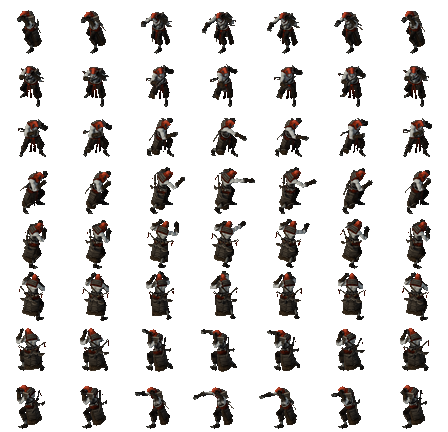
Sprite sheets are exported with a manifest file that helps post-processors and renderers understand their layout. The manifest for the above sprite sheet looks like this:
{
  "frame_resolution": {
    "x": 64,
    "y": 54
  },
  "directions": 8,
  "animations": [
    {
      "name": "punch",
      "frames": 7
    }
  ]
}
Check out the project repository here!
There’s still more work to do to make this process a bit more automatic, standardize scaling between renders, and handle more dynamic animations requiring varying frame sizes, but I’m pretty happy with the results so far. Next, I’ll tinker with lighting and shaders within Blender combined with a few more post-processing steps to sharpen edges and colors. I think it’s possible this could lead to an interesting and unique visual style, along with great performance!
As a final note, this technique comes with some heavy trade-offs. We get to avoid lots of runtime computation, but we’ll need enough video memory to hold the generated textures. (File size is less of a concern as sprite sheets tend to compress well.) Additionally, it sets a practical limit on the customization of in-game objects, as you need to pre-render every possible combination ahead of time. It also assumes a fixed camera angle. It’s perfect for my game, but maybe not for yours!